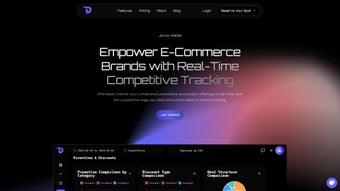

Download DataDripper – Real‑Time Competitive Tracking for E‑Commerce
Overview
In today’s ultra‑competitive e‑commerce landscape, the ability to monitor rival activity in real time can be the difference between market leadership and obscurity. DataDripper is an AI‑powered, cloud‑based software application built specifically for online retailers who need instant, accurate insight into competitor pricing, promotions, product launches, and inventory shifts. Unlike traditional manual scraping tools that require constant upkeep, DataDripper runs continuously in the background, feeding a single, unified dashboard with live updates that are both granular and actionable.
The platform automatically cleans, normalizes, and enriches raw web data, eliminating duplicate entries and formatting errors that typically plague spreadsheet‑based approaches. By preserving a historical archive of every scrape, DataDripper also enables long‑term trend analysis, allowing businesses to identify seasonal patterns, benchmark performance against industry standards, and forecast future pricing strategies with confidence. Whether you operate a boutique Shopify store, a multi‑channel marketplace presence, or a large enterprise with dozens of brand sites, DataDripper scales effortlessly to match your data volume and performance requirements.
Its subscription model guarantees regular feature updates, security patches, and access to a growing library of AI‑driven analytics tools, ensuring you always stay one step ahead of competitors while maintaining a secure, GDPR‑compliant environment. In short, DataDripper transforms chaotic web data into clear, strategic intelligence that powers faster decision‑making, smarter budget allocation, and ultimately, higher revenue growth.
Key Features & Benefits
- Real‑Time Scraping Engine: Monitors competitor websites every five minutes, capturing price changes, discount codes, new product listings, and stock levels the moment they appear.
- AI‑Driven Data Cleaning: Uses machine‑learning algorithms to deduplicate records, correct formatting inconsistencies, and validate data accuracy, delivering reliable insights without manual intervention.
- Historical Archive & Benchmarking: Stores every scrape in a secure, searchable database, enabling year‑over‑year trend analysis, seasonal pattern detection, and performance benchmarking against industry averages.
- Customizable Alert System: Allows users to set threshold‑based notifications for price drops, flash sales, or inventory changes, delivered via email, Slack, or in‑app push notifications.
- Interactive Dashboard Visualization: Offers drag‑and‑drop charts, heat maps, and comparative tables that turn raw data into visual stories, making strategic discussions faster and more persuasive.
- Scalable Cloud Architecture: Handles everything from a single Shopify store to hundreds of URLs across multiple domains, automatically adjusting compute resources during traffic spikes.
- Secure & GDPR‑Compliant: End‑to‑end encryption, role‑based access controls, and data residency options keep both scraped data and user analytics safe and compliant.
- Seamless Integration Options: Export data to CSV, Google Sheets, or connect via RESTful API to BI platforms such as Power BI, Tableau, or custom analytics pipelines.
Each feature works together to slash the time spent on manual competitor research from hours or days down to minutes, while simultaneously improving data quality and strategic insight. The AI‑driven cleaning engine removes noise, ensuring that your pricing team, merchandisers, and product managers can focus on actionable decisions rather than data wrangling. The historical archive creates a powerful knowledge base that can be leveraged for predictive pricing models, while the alert system guarantees that no critical market movement goes unnoticed. Finally, the platform’s scalability and integration capabilities mean that whether you’re a solo entrepreneur or a global brand, DataDripper fits seamlessly into your existing tech stack, delivering consistent value across the organization.
Installation, Usage & Compatibility
DataDripper is delivered as a pure SaaS solution, eliminating the need for local installation or complex IT deployments. To get started, simply navigate to the official website, choose a subscription tier that matches your monitoring needs, and create an account using your business email. After registration, you’ll receive a welcome email containing a secure link to the onboarding wizard. The wizard walks you through three critical steps: (1) selecting the competitor domains you wish to track, (2) defining scrape frequency (ranging from 5‑minute intervals to daily snapshots), and (3) configuring alert thresholds based on price, discount percentage, or inventory level. Once these parameters are saved, the platform immediately begins harvesting data and populating your personalized dashboard.
Because DataDripper runs entirely in the browser, it is compatible with any modern operating system that supports recent versions of Chrome, Edge, Firefox, or Safari. This includes Windows 10/11, macOS Ventura and later, major Linux distributions, Android 10+ and iOS 14+. For teams that prefer a native‑like experience, the web app can be installed as a Progressive Web App (PWA), creating a desktop shortcut on Windows or macOS and a home‑screen icon on mobile devices while still leveraging the cloud backend for processing power and storage.
Power users and developers can take advantage of the robust RESTful API, which provides programmatic access to raw JSON feeds, custom report generation, and webhook triggers for third‑party automation tools like Zapier or Integromat. Detailed API documentation, interactive Swagger UI, and a sandbox environment are available within the user portal, allowing you to test endpoints before moving to production. In addition, role‑based permissions let administrators grant read‑only or full‑access rights to specific team members, ensuring that sensitive competitor data remains protected while still being widely usable across marketing, finance, and product teams.
Pros, Cons & Frequently Asked Questions
Pros
- Automated, real‑time data collection eliminates manual spreadsheet work.
- AI‑enhanced cleaning guarantees high accuracy and reduces noise.
- Historical archive enables deep trend analysis and strategic benchmarking.
- Custom alerts keep teams instantly aware of critical competitor moves.
- Web‑based, so it works on Windows, macOS, Linux, Android, and iOS browsers.
- Secure, GDPR‑compliant handling of scraped data.
- Robust API and export options integrate smoothly with existing BI tools.
- Scalable cloud infrastructure adapts to small shops and large enterprises alike.
Cons
- Subscription pricing may be a barrier for very small startups or solo entrepreneurs.
- Initial setup requires careful definition of target URLs and alert thresholds.
- Heavy reliance on website structure; major site redesigns can temporarily affect scraping accuracy.
- Limited offline functionality since the platform is cloud‑dependent.
- Advanced AI cleaning features are locked behind higher‑tier plans.
Frequently Asked Questions
How does DataDripper collect competitor data without violating terms of service?
DataDripper uses respectful, rate‑limited scraping techniques that mimic typical user behavior. It adheres to robots.txt directives, accesses only publicly available pages, and provides a compliance guide to help users stay within legal boundaries for each market.
Can I monitor more than one competitor site at the same time?
Yes. All subscription tiers are designed to scale, allowing you to track dozens—or even hundreds—of competitor URLs simultaneously. Each URL can have its own scrape frequency and alert rules, giving you granular control over data collection.
What kind of support is available if I encounter an issue?
DataDripper offers 24/7 email support, live chat during business hours, and a comprehensive knowledge base. Premium plans also include a dedicated account manager and priority response times to ensure critical issues are resolved quickly.
Is there a free trial or demo version?
A 14‑day free trial is available with full access to every feature. No credit card is required to start, and you can cancel anytime before the trial ends to avoid charges.
How often is the platform updated with new features?
DataDripper follows a continuous deployment model, releasing minor improvements weekly and major feature updates quarterly. All updates are applied automatically, so you always work with the latest version without manual installs.
Conclusion & Call to Action
For e‑commerce brands that refuse to let competitors dictate market trends, DataDripper provides a powerful, secure, and user‑friendly solution that transforms scattered web data into clear, strategic intelligence. Its real‑time scraping, AI‑enhanced cleaning, and robust alert system empower teams to act swiftly, allocate resources wisely, and uncover hidden opportunities before they become mainstream. While the subscription cost reflects its enterprise‑grade capabilities, the productivity gains and revenue impact quickly outweigh the expense for most growing businesses.
Ready to turn competitor chaos into competitive advantage? Start your free 14‑day trial today and experience how DataDripper can streamline market monitoring, sharpen pricing strategy, and fuel e‑commerce growth. Download now, secure your spot, and stay ahead of the competition with confidence.
DataDripper delivers a sophisticated yet approachable platform for competitive intelligence. Its AI‑driven data cleaning and real‑time alerts dramatically reduce manual effort, while the visual dashboard makes complex data easy to digest. The cloud‑only delivery ensures cross‑platform compatibility, and the API opens doors for deeper integration. The only drawback is the price point for very small shops, but the ROI from faster decision‑making typically justifies the cost.



.png)



